- Home
- Chores Rota
- Guide
Chores Rota guide
This is the guide that comes with the kit, in full. It shows how to set up a fair chore rotation in your own AI app and what you can ask it every day.
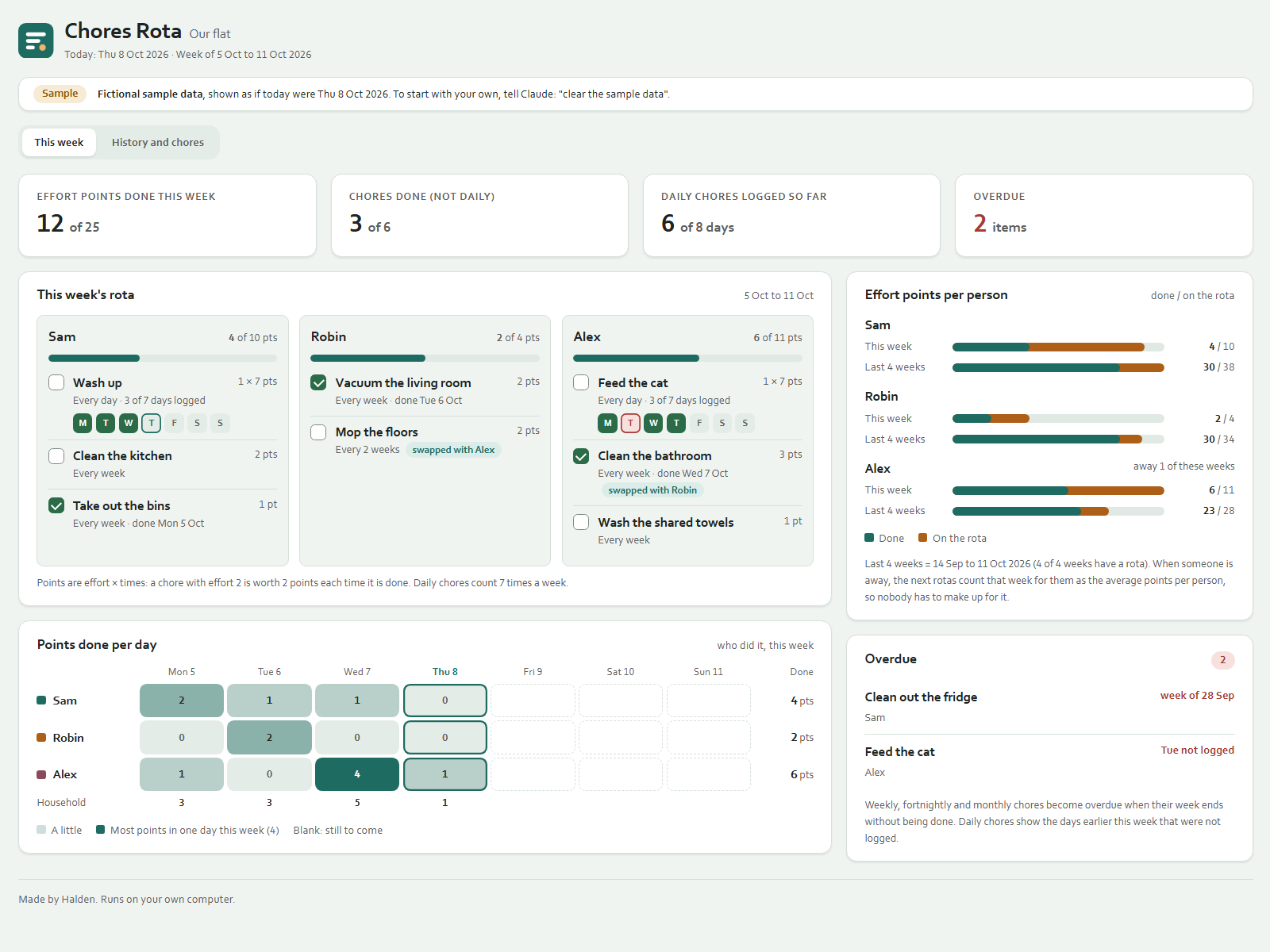
Share the chores in your home fairly. Claude makes a rota every week with a fixed rule, you tell Claude what got done, and the dashboard shows who is on what, what is done, everyone's effort points and what is overdue.
On your phone or in a chat app
Start a new chat in your AI app (ChatGPT, Gemini, Grok or Claude), attach the kit zip and press send. Your AI asks the setup questions and gives you your dashboard as a web page to open in your browser. Type save when you are done and keep the save file: next time, start a new chat, attach the zip and that file. Everything below about folders and files is for the Claude desktop app on a computer.
Getting started
- Unpack the zip into a folder of your choice.
- Open the Claude desktop app (Code tab or Cowork) with that folder as the working folder.
- Type:
Read Ownkit/START.md and follow it. - Answer up to five short questions: who lives there, which chores, how often, which ones are more work, and whether to show sample data first.
Claude then creates dashboard.html, data/rota.json, CLAUDE.md and two skills, and makes this week's rota.
Every day
Just say what happened, in your own words:
- "Sam did the bins."
- "I washed up." (daily chores are logged per day)
- "Alex did the bins for Sam." (the points go to Alex)
- "Robin swapped the bathroom with Alex this week."
- "Alex is away next week."
- "Skip the fridge from last week."
Double-click dashboard.html to see it. Refresh the page after Claude logs something. It works without internet.
Every week
Say "Make this week's rota" (or "next week's"). Claude also offers it when a new week has no rota yet.
How the rota is made
- Each chore is worth effort points: its effort (1, 2 or 3, your choice) times how often it comes up that week. A daily chore counts 7 times.
- Chores are handed out heaviest first. Each one goes to the person with the fewest points so far, counting the 3 weeks before, so the work evens out over time.
- Whoever did a chore last time counts as 3 points heavier for it, so chores move around.
- Ties go to whoever had the chore longest ago, then to the order of names.
- Weeks someone was away, or did not live there yet, count for them as that week's average points per person (rounded down), so nobody has to make up for a holiday.
- The same data always gives the same rota. Claude uses a small script for this when Node.js is on your computer, and otherwise follows the same steps by hand and shows its working.
Chores every 2 weeks fall in the first week and every other week after it. Monthly chores fall in the week that contains the 1st of the month.
The dashboard
- This week: each person's chores with done or not done, daily chores as Monday to Sunday squares, and points done out of points on the rota.
- Effort points per person: this week and the last 4 weeks (this week and the 3 before it), done and on the rota.
- Overdue: chores from earlier weeks that were not done, and days earlier this week a daily chore was not logged.
- History and chores: points per week, every chore with how often, its effort, who has it this week and when it was last done, and the recent log.
Sample data
If you loaded the sample, you see a fictional household of three (Sam, Robin and Alex), shown as if today were Thu 8 Oct 2026. Say "clear the sample data" to switch to your own rota.
Good to know
- How often and how much effort a chore takes is your household's choice; Claude does not give cleaning advice.
- Your data stays in this folder. Claude never sends, publishes or pays anything, and never asks for passwords.
- People and chores are never deleted, only switched off, so old weeks stay correct.