Family Week Planner guide
This is the guide that comes with the kit, in full. It shows how to set up a family week planner in your own AI app and what you can ask it every day.
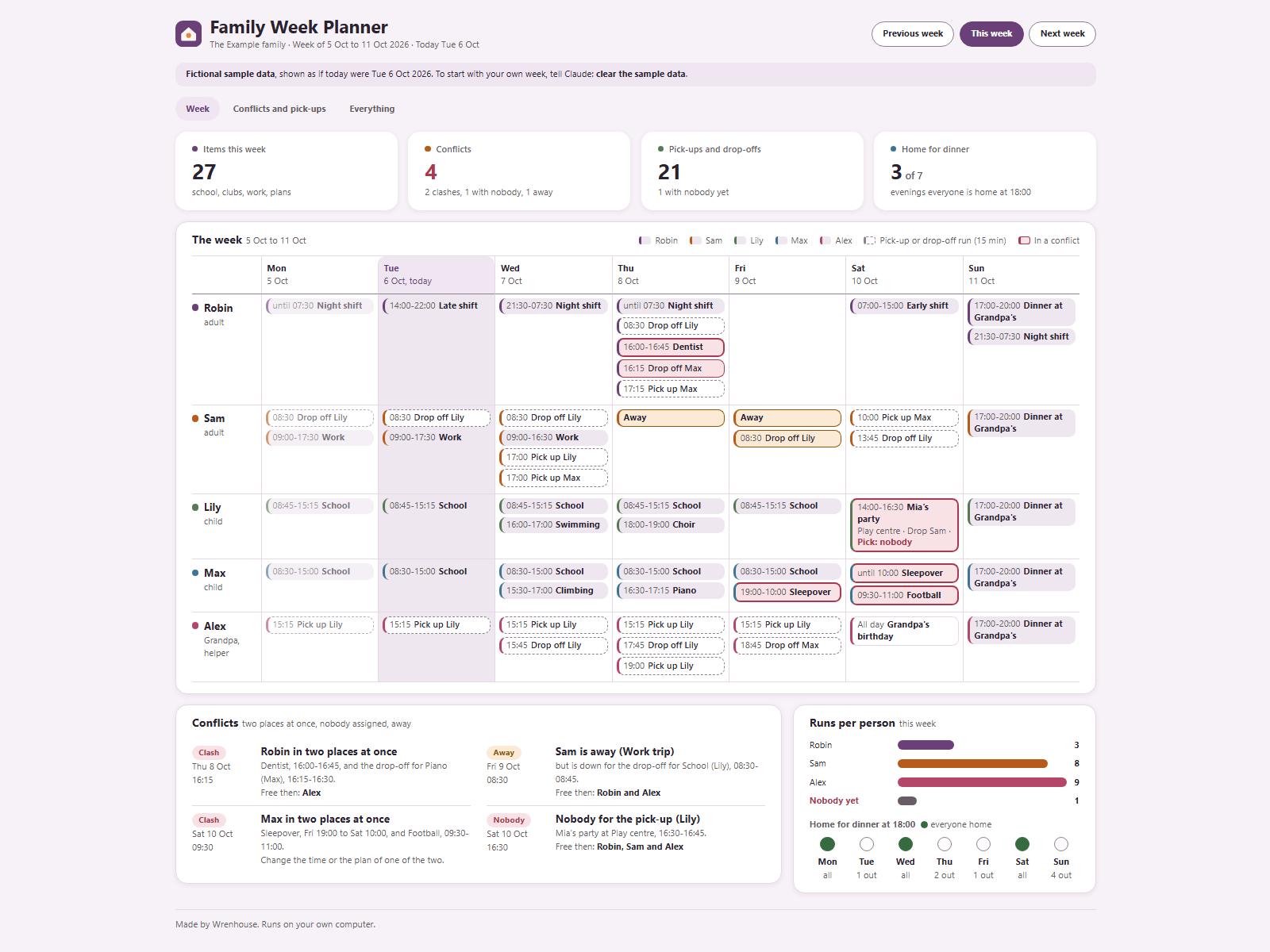
Everyone's week in one view: school, clubs, work shifts, appointments, meals out and parties, and who drops off and picks up. You tell Claude what is coming up; the dashboard shows the week and flags conflicts before they happen.
On your phone or in a chat app
Start a new chat in your AI app (ChatGPT, Gemini, Grok or Claude), attach the kit zip and press send. Your AI asks the setup questions and gives you your dashboard as a web page to open in your browser. Type save when you are done and keep the save file: next time, start a new chat, attach the zip and that file. Everything below about folders and files is for the Claude desktop app on a computer.
Getting started
- Unpack the zip into a folder of your choice.
- Open the Claude desktop app (Code tab or Cowork) with that folder as the working folder.
- Type:
Read Ownkit/START.md and follow it. - Answer up to five short questions: who is in the family, who else sometimes drives, whether your week starts on Monday or Sunday, how long a run takes and when you eat, and whether to show sample data first.
Claude then creates dashboard.html, data/week.json, CLAUDE.md and two skills. After that, tell Claude your regular week, one person at a time.
Every day
Just say it in your own words:
- "Lily has swimming every Wednesday from 16:00 to 17:00. Grandpa drops her off, Sam picks her up."
- "Robin works a night shift on Thursday, 21:30 to 07:30."
- "Grandpa picks Lily up on Thursday instead."
- "No swimming this week."
- "Sam is away Thursday and Friday."
- "Any clashes this week?" or "Who can pick Lily up on Saturday?"
- "Write next week for the family group chat." (Claude drafts it; you send it.)
Double-click dashboard.html to see it. Refresh the page after Claude changes something. It works without internet.
What counts as a conflict
- Clash: someone is in two places at once. That includes a parent whose drop-off or pick-up run overlaps their own shift or appointment. Back-to-back is fine. Two runs to the same place at the same time count as one trip.
- Nobody: a drop-off or pick-up that nobody is down for yet.
- Away: someone is away that day but still has something planned, or is down to drive.
For each conflict with a run, the dashboard shows who is free then: the adults and helpers with nothing else at that moment who are not away. That is a suggestion; you decide who goes.
A drop-off run is the minutes you set (15 if you skipped it) before the start; a pick-up run the same minutes after the end.
The dashboard
- Week: a row per person and a column per day, with their plans and the runs they drive. Conflicts are marked. Night shifts and sleepovers that end the next morning show on both days.
- Conflicts and pick-ups: every conflict with who is free then, every drop-off and pick-up of the week with its driver, runs per person, and who is out at dinner time.
- Everything: all items with how often they happen, the people and helpers, and your settings.
- Previous week / Next week: look around. Everything is worked out from your plans, so repeating items show up in every week they happen.
Sample data
If you loaded the sample, you see the fictional Example family, shown as if today were Tue 6 Oct 2026, with 4 conflicts: Robin's dentist overlaps a drop-off, Max is at a sleepover and football at once, nobody picks Lily up from a party, and Sam is away but down for a drop-off. Say "clear the sample data" to switch to your own week.
Good to know
- Times are on a 24-hour clock. Repeating items can be weekly or every 2 (or more) weeks, with an end date if you like. One-day exceptions ("no school on Friday", "leaves at 16:30 on Wednesday") change that day only.
- How long a run takes, when you eat and when your week starts are your own settings.
- Claude gives no advice on childcare rules, school rules or at what age children may go somewhere alone; that is up to your family and local rules.
- Your data stays in this folder. Claude never sends, publishes or books anything, never contacts anyone, and never asks for passwords.