- Home
- Reading List
- Guide
Reading List guide
This is the guide that comes with the kit, in full. It shows how to set up a reading tracker in your own AI app and what you can ask it every day.
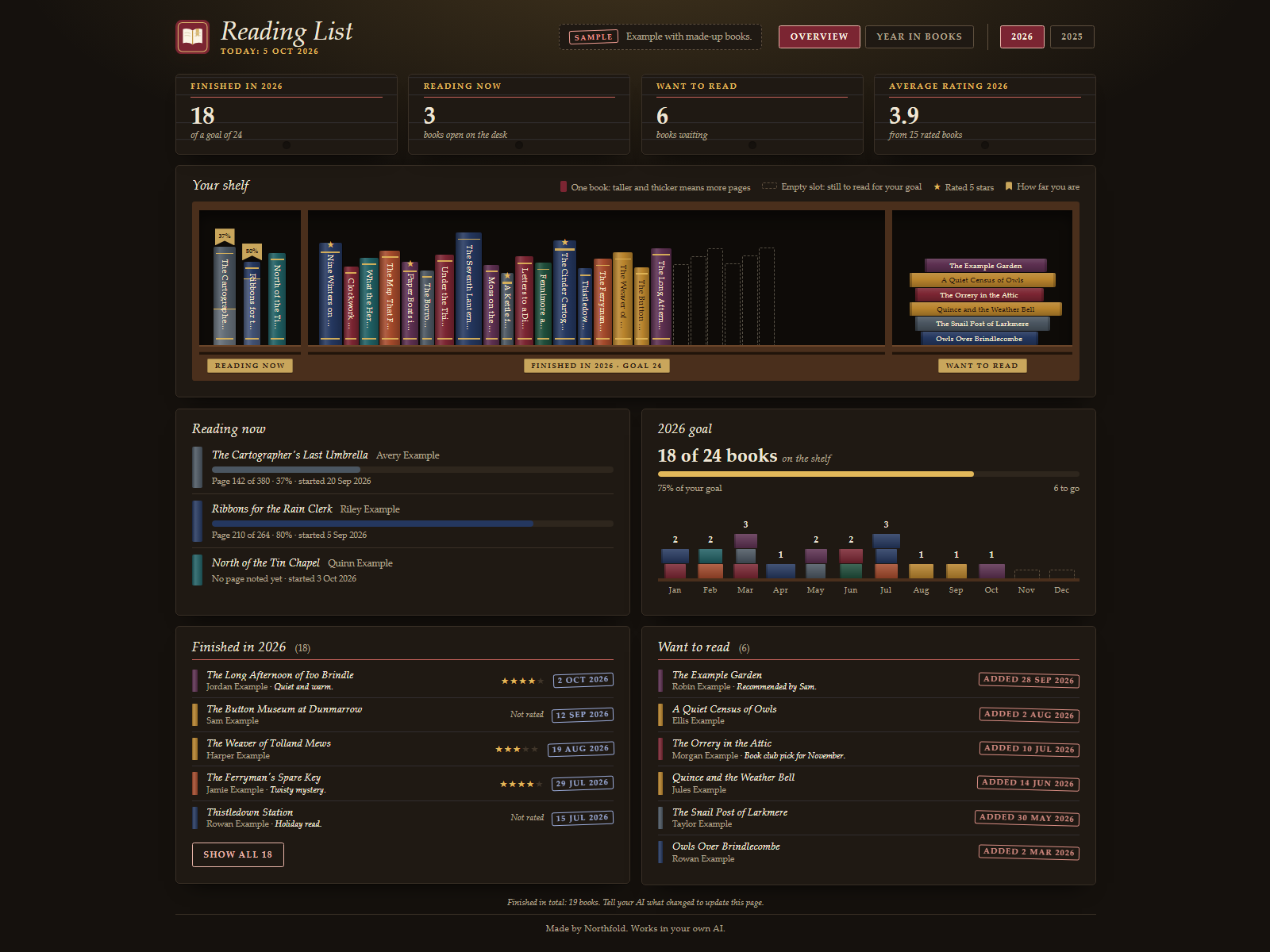
A reading list you talk to. You tell Claude about books, Claude writes them down, and your dashboard shows what you are reading now, what you finished this year and what is waiting on your want-to-read list. It is a small, free kit, so it is also a quick way to see how an Ownkit kit installs.
On your phone or in a chat app
Start a new chat in your AI app (ChatGPT, Gemini, Grok or Claude), attach the kit file and press send. Your AI shows you an example dashboard right away, asks one question and then makes it yours. Before you close the chat, type save and keep that file (only the newest one): next time, start a new chat, attach the kit file and your save file, and press send. Everything below about folders and files is for the Claude desktop app on a computer.
Getting started
- Unpack the zip into a folder, for example
Reading. - Open the Claude desktop app (Code tab or Cowork) and choose that folder as the working folder.
- Type:
Read READ ME FIRST.txt and follow it. - You see an example right away. Then tell Claude which book you are reading now, or start with an empty list.
Claude then creates dashboard.html, data/books.json, CLAUDE.md and one skill in your folder. The example at the start uses invented books and authors and never mixes with your own list.
Every day
Just say what happened:
- "Add The Example Garden by Robin Example to my want-to-read list."
- "Started The Example Garden today. It has 310 pages."
- "I'm on page 120 now."
- "Finished it, 4 stars, loved the ending."
- "I gave up on that one." (Claude asks whether to move it back to want-to-read or remove it.)
- "Set my goal for this year to 20 books."
Ask about your list:
- "How am I doing this year?"
- "What should I read next from my list?"
- "Which books did I give 5 stars?"
Fix mistakes: "That was 3 stars, not 4." or "I finished it on Sunday, not today."
The dashboard
Double-click dashboard.html. It opens in your browser, works offline and makes no internet connections. Claude opens it again for you after every update.
- Tiles: books finished this year (and your goal, if you set one), reading now, want to read, and your average rating this year.
- Reading now: each book with the page you are on and a progress bar, when you told Claude the page and the total.
- Goal and months: how far you are toward your goal, and a bar per month with the number of books you finished.
- Finished: the latest books you finished with date, stars and your note. "Show all" opens the full list.
- Want to read: your waiting list, newest first.
- Years: once you have books in more than one year, buttons at the top switch between years.
How the numbers are worked out:
- Goal progress = books finished this year divided by your goal, rounded to a whole percent.
- Reading progress = the page you are on divided by the total pages, rounded to a whole percent. Without a total, it shows only the page.
- Average rating = the average of the books you rated that year, one decimal. Books without a rating are left out.
- If you leave out an author, page count or rating, it stays empty. Claude does not fill it in for you.
Good to know
- Your data stays in your folder:
data/books.jsonis the list, and the dashboard holds a copy of it. - Claude never buys, orders or reserves books, and never sends anything on your behalf.
- To start over, ask Claude to clear your list. It will ask before removing anything.