Subscription Tracker guide
This is the guide that comes with the kit, in full. It shows how to set up a subscription cost tracker in your own AI app and what you can ask it every day.
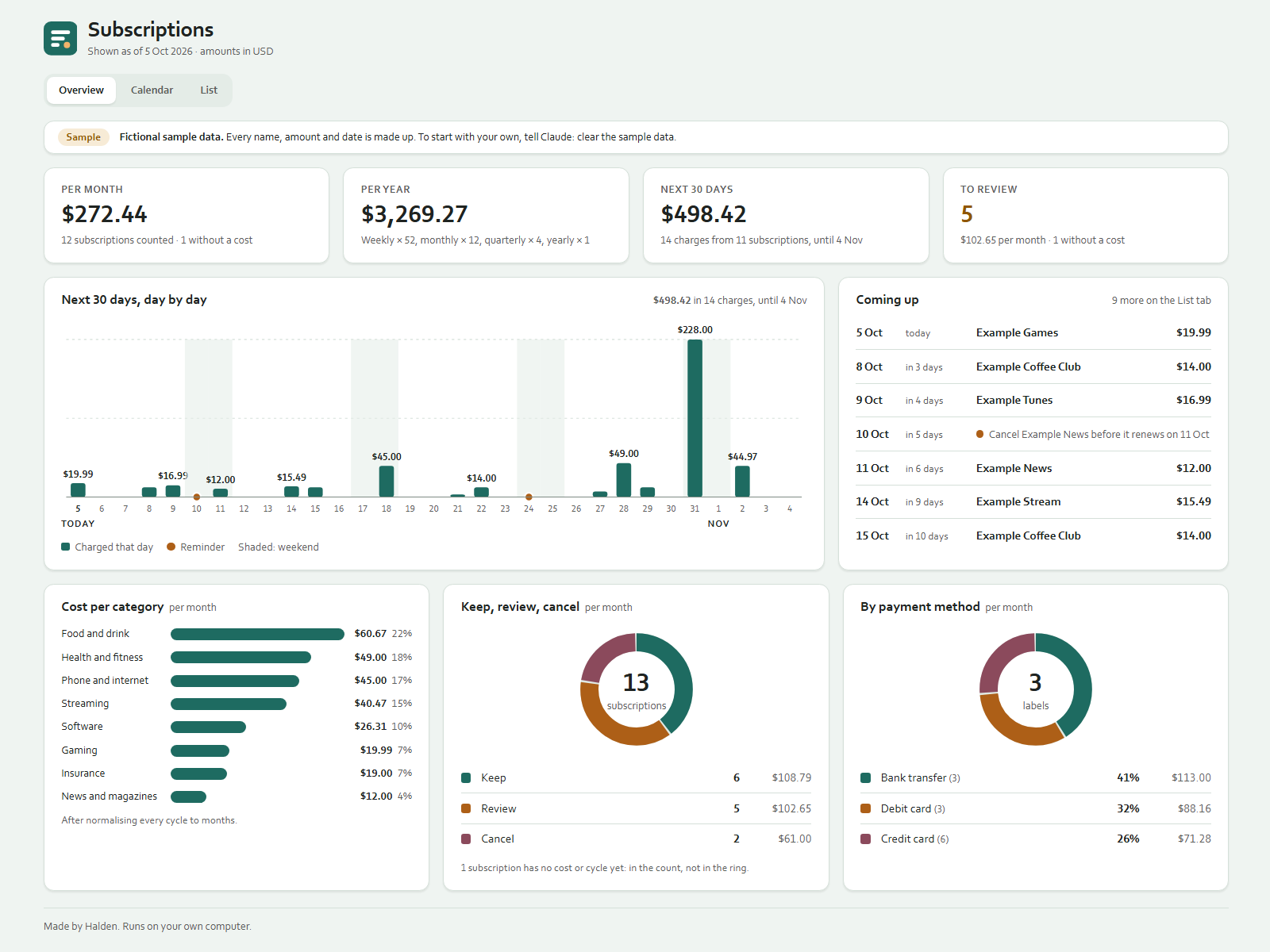
Every subscription that renews by itself, in one list: streaming, software, phone, gym, insurance and the rest. You tell Claude what changed; Claude updates data/subscriptions.json and dashboard.html. Double-click dashboard.html to see it, and refresh after a change. It works offline.
On your phone or in a chat app
Start a new chat in your AI app (ChatGPT, Gemini, Grok or Claude), attach the kit zip and press send. Your AI asks the setup questions and gives you your dashboard as a web page to open in your browser. Type save when you are done and keep the save file: next time, start a new chat, attach the zip and that file. Everything below about folders and files is for the Claude desktop app on a computer.
What you can say
- "I signed up for Example Stream at $15.49 a month, renews on the 14th."
- "Example Tunes goes up to $17.99 from next month."
- "Put the design app on review." / "Keep the cloud storage."
- "Cancel the gym, last payment in March."
- "What renews in the next 30 days?" / "What do I pay per month in total?"
- "Remind me to compare the home insurance a week before it renews."
- "Make me a cancellation checklist for Example News."
Per subscription Claude keeps: name, cost, billing cycle (weekly, monthly, quarterly or yearly), next renewal date, payment method label, category, a keep / review / cancel flag, and a short note.
What the dashboard shows
Overview: total per month and per year, a day-by-day chart of what renews in the next 30 days (you can change the number of days), what is coming up next with your reminders, how many subscriptions are flagged for review, cost per category, cost per payment method label, and the keep / review / cancel split. Calendar: this month and next month day by day, and the expected charges for the next 12 months. List: every renewal in the next 30 days, the flagged subscriptions with your notes, all reminders, and the full list.
How the totals are calculated
Cycles are made comparable by turning every price into a yearly amount, then dividing by 12:
| Cycle | Per year | Per month | | --- | --- | --- | | Weekly | cost x 52 | cost x 52 / 12 | | Monthly | cost x 12 | cost | | Quarterly | cost x 4 | cost x 4 / 12 | | Yearly | cost x 1 | cost / 12 |
Examples from the sample: $14.00 a week is $728.00 a year and $60.67 a month; $44.97 a quarter is $14.99 a month; $228.00 a year is $19.00 a month. Amounts are rounded to cents only when shown, so a per-month total can differ by a cent from adding up the rounded rows.
Weekly x 52 is an approximation: 52 weeks are 364 days and a year has 365 or 366, so some years have 53 weekly charges.
- In the totals: active subscriptions, and cancelled ones that are still charged until their last payment, as long as they have a cost and a cycle.
- Not in the totals: ended subscriptions, and subscriptions without a cost or cycle. Those show under "Needs details", and the tiles say how many are left out.
- Renewal dates: charges fall on the next renewal date plus whole cycles. Monthly, quarterly and yearly keep the same day of the month, or the last day of a shorter month (31 Jan monthly gives 28 Feb, 31 Mar, 30 Apr). If a stored date has passed, the dashboard moves on to the next one by itself.
- Next 30 days and Calendar: the real charge dates from today. A weekly subscription can charge 4 or 5 times in 30 days, so these views can differ from the normalised per-month total.
Cancelling: you stay in control
Claude never cancels, pauses or changes a subscription, never logs in to any service and never contacts a provider. When you want to stop something, Claude can:
- Flag it
cancel. - Write a checklist in
checklists/with the facts from your list and blanks for what only you know (notice period, the date to cancel by). You follow it yourself. - Add a reminder: it appears on the dashboard, and Claude gives you a line to copy into your own calendar.
- Once you say it is cancelled and when the last payment is, mark it as ending. After that date it moves to "Ended" and leaves the totals.
Good to know
- One currency. Claude does not convert; give amounts as they appear on your statement.
- The payment method is just a label ("Debit card", "Credit card", "Bank transfer"). Never give card or account numbers; Claude will not store them.
- This is not a household budget: one-off and day-to-day spending is not tracked.
- Claude stores only what you say. A price or date you do not know stays "Unknown"; Claude does not look prices up.
Sample data
If you loaded the sample, the dashboard shows 14 made-up subscriptions as if today were 5 Oct 2026, with a "Fictional sample data" banner. Say "clear the sample data" to go back to your own list.
Files in your folder
dashboard.html (the page), data/subscriptions.json (your list), checklists/ (cancellation checklists), CLAUDE.md (Claude's instructions), .claude/skills/ (two skills: logging and reviewing). The Ownkit folder keeps the templates and the sample; you can leave it there.