- Home
- Travel Planner
- Guide
Travel Planner guide
This is the guide that comes with the kit, in full. It shows how to set up a day-by-day trip planner in your own AI app and what you can ask it every day.
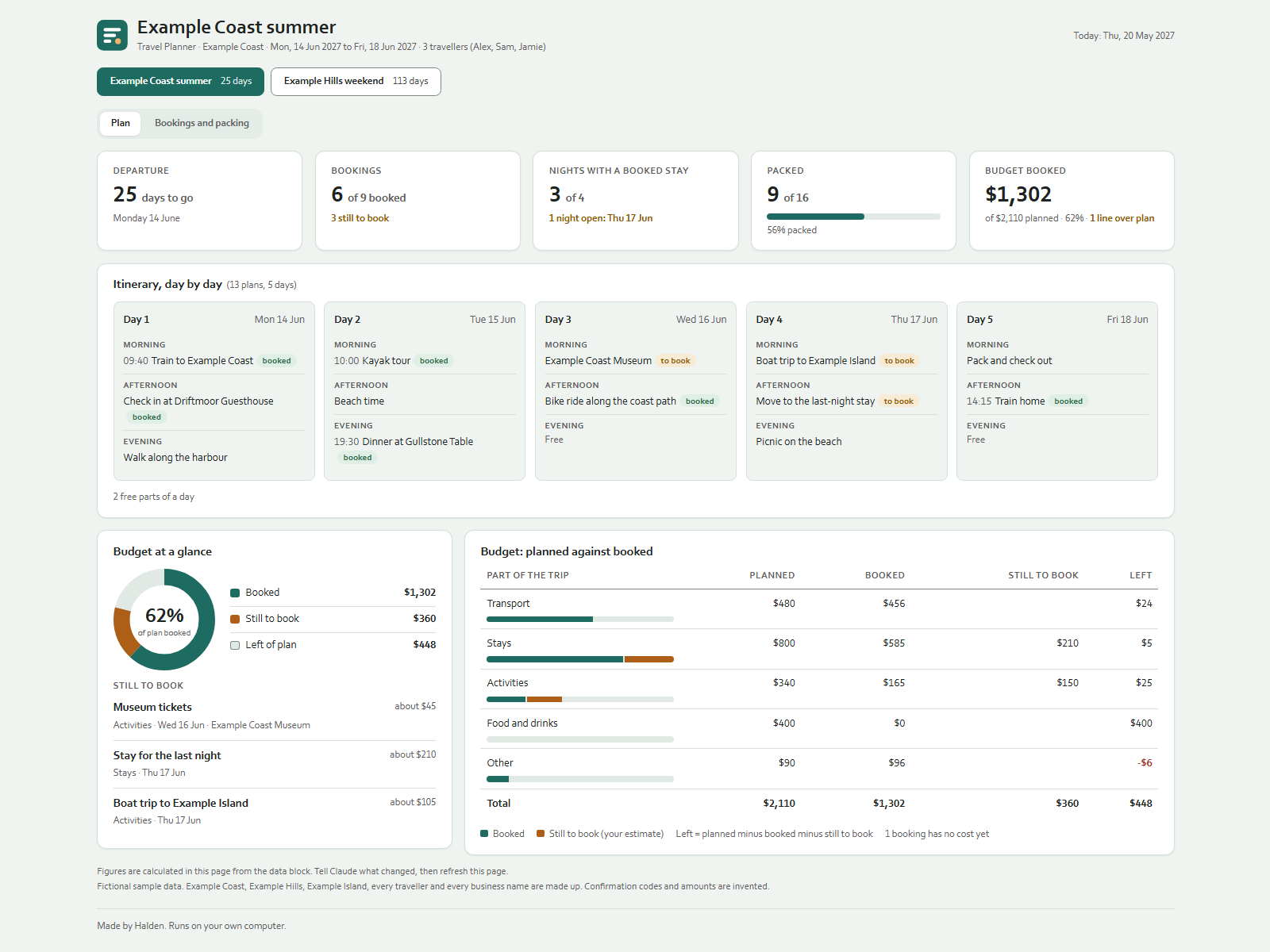
Plan your trips by talking to Claude. Claude keeps one data file per folder and a dashboard you open in your browser.
On your phone or in a chat app
Start a new chat in your AI app (ChatGPT, Gemini, Grok or Claude), attach the kit zip and press send. Your AI asks the setup questions and gives you your dashboard as a web page to open in your browser. Type save when you are done and keep the save file: next time, start a new chat, attach the zip and that file. Everything below about folders and files is for the Claude desktop app on a computer.
Getting started
- Unpack the zip into a new folder.
- Open the Claude desktop app (Code tab or Cowork) and choose that folder as the working folder.
- Type:
Read Ownkit/START.md and follow it.Claude asks 5 short questions and creates everything. - Double-click
dashboard.htmlto open the dashboard. After a change, refresh the page.
What the dashboard shows
- Trip buttons at the top when you have more than one trip, each with the days to go. The page opens on your next trip.
- Departure: days until you leave, or "Day 2 of 5" while you are away.
- Bookings: how many are booked and how many are still to book.
- Nights with a booked stay: which nights of the trip have no booked place to sleep yet.
- Packed: how many packing items are ticked.
- Budget booked: what you booked against what you planned.
- Plan tab: the itinerary per day (morning, afternoon, evening), a budget ring with what is still to book, and the budget per part of the trip (planned, booked, still to book, left).
- Bookings and packing tab: every booking on a timeline of the trip days with its confirmation code and cost, which nights have a booked stay, and the packing list per category with a progress ring.
With the fictional sample data (and the date set to 20 May 2027) you see the Example Coast trip with 25 days to go, 6 of 9 bookings booked and 9 of 16 items packed.
Things you can say
- "Plan a trip to the coast from 14 to 18 June for the three of us."
- "Add a museum visit on day 2 morning."
- "Booked the hotel for 3 nights, $585, code DM-40518."
- "We still need to book a boat trip on Thursday, about $105."
- "Add sunscreen to the packing list." / "Packed the chargers."
- "Budget $480 for transport."
- "What is still open for this trip?"
- "Copy the packing list from our last trip."
Good to know
- Starter packing list: a neutral 12-item starter list (ID, chargers, toothbrush and so on) can be added to new trips. You choose this during setup.
- Ticks: the checkboxes on the dashboard show your data. Tell Claude what you packed; clicking in the page does not save anything.
- Costs: amounts are shown in the currency you chose. For a cost in another currency, give Claude the amount in your own currency; it does not look up exchange rates.
- No facts about places: Claude does not look up or state opening hours, prices, weather, safety advice, or visa and entry rules. Check entry requirements with the official government sources for your destination and nationality.
- Nothing is booked for you: Claude only keeps your records. It never books, pays or sends anything.
- Sample data: say "clear the sample data" to remove the made-up trips and get your own settings back.
- Date style: say "Show dates the way they are written in my country" and Claude asks which country.
- Your files: everything stays in this folder.
data/trips.jsonholds your data;dashboard.htmlholds a copy of it for the page.